How syncing works
QuillJet turns a Webflow event into a contact in your own email tool. A shopper places an order, someone submits a form, or a CMS item is created or updated, and QuillJet extracts a contact from that event and upserts it into the list or audience you picked, subscribed or not as the rule decides. QuillJet never sends email itself: it syncs the contact into your tool, and your tool owns all sending.
This page explains the path an event takes, what happens when things go wrong, and one thing that surprises people: QuillJet does not backfill your old orders.
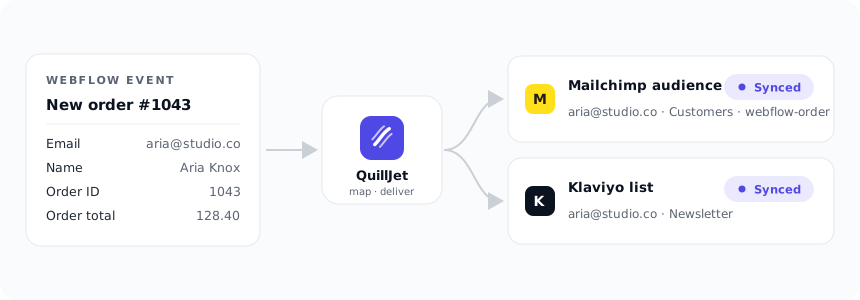
From event to contact (the flow)
Every sync follows the same steps:
- Webflow fires a webhook to QuillJet when one of your enabled triggers happens (new order, inventory change, form submission, CMS item created or updated).
- QuillJet verifies the Webflow signature and finds the matching site. Unsigned or unmatched events are rejected or ignored.
- The event is stored, then matched against your sync rules. Each enabled rule whose trigger matches the event creates one delivery.
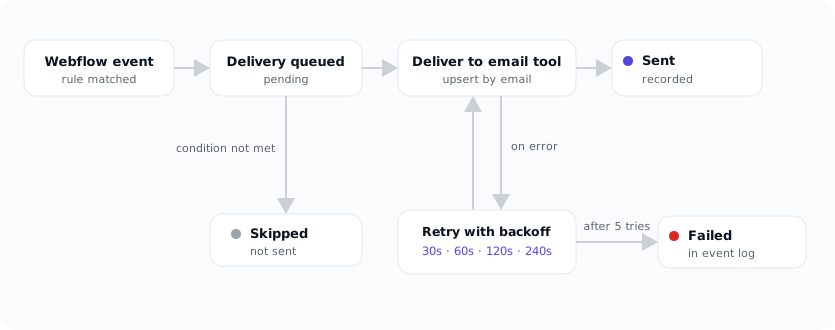
- Each delivery is queued and handled by a background worker: it checks the rule's conditions, extracts the contact, applies the rule's New contacts setting, and adds or updates the contact in the email tool the rule points to.
- The result (sent, skipped, or failed) is recorded in the event log.
Matched by email
QuillJet matches contacts by email address. If the email already exists in your list or audience, QuillJet updates that contact with the new fields (and tags, in Mailchimp, ActiveCampaign and Omnisend). If it does not exist yet, QuillJet creates it. The same person is not added twice.
This is why syncing the same shopper again is safe: a repeat order updates the existing contact rather than making a duplicate (in GetResponse, a contact already on the list is left unchanged). See subscribers and contacts for how the match works in each tool.
Retries and backoff
If your email tool is briefly unreachable or returns an error, QuillJet does not give up after one try. It retries the delivery with increasing waits between attempts: 30 seconds, then 60 seconds, then 120 seconds, then 240 seconds. A delivery gets up to 5 attempts in total.
If your tool reports a rate limit, QuillJet waits for the time your tool asks for before trying again. If your tool rejects the contact itself (HTTP 400 or 422), the delivery is marked failed straight away, because the same contact would get the same answer. When a delivery is marked failed, the account owner is emailed, at most once per email tool per day; the event log lists every failure.
Tip: Most temporary problems clear on their own through retries. Check the event log before doing anything manually.
As events arrive, and what is NOT backfilled
QuillJet queues a delivery when Webflow sends it an event. There is no scheduled batch and no import step.
QuillJet does not backfill historical orders, past form submissions, or existing CMS items when you install the app or create a rule. Only new events that fire after your triggers are enabled and your rule is turned on will sync. If you connect a store that already has a thousand orders, those thousand orders are not sent to your email tool. The next order that comes in is.
If you need existing contacts in your email tool, import them there directly using your tool's own import feature. QuillJet handles everything from that point forward.
Every delivery is in the event log
Every event QuillJet receives for a connected site is stored, and every delivery it creates shows up in the event log with its status: pending, sent, skipped, or failed. Open any delivery to see the contact that was built, the tool it was sent to, and the exact response or error. Deliveries can be retried with one click.
Idempotent and safe to retry
Because QuillJet upserts by email, retrying a delivery is safe. Retrying does not create a second contact: it updates the same one. Webflow itself may resend a webhook if it does not get a success response, and QuillJet deduplicates those repeats so a single real event does not sync twice. Whether the retry comes from Webflow, from QuillJet's own backoff, or from you clicking retry, the end result is one up-to-date contact.
Still seeing something unexpected? Start with troubleshooting, or reach us through our support form.