Field mapping
Field mapping decides exactly what a sync rule writes into your email tool. QuillJet already extracts the essentials (email and name), and you add your own mappings on top to fill merge fields, attributes, or custom fields. This page covers what maps automatically, adding your own mappings, transforms, constants and tags, Automap, and the live preview.
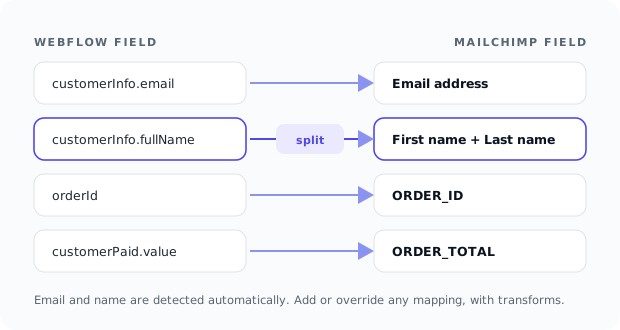
What QuillJet maps automatically
Before you map anything, QuillJet pulls the core contact out of the Webflow event:
- Email. QuillJet checks known locations across order, form, and CMS payloads (for example
customerInfo.email,data.email, andfieldData.email), and if none match, it scans the values for the first email-shaped string. A contact with no email cannot sync, and that delivery is skipped withno_email_in_payload. - First and last name. QuillJet prefers explicit first and last name fields, in several languages (including
voornaamandachternaam,prenomandnom). If it only finds a full name, it splits it into first and last. - Order details are yours to map. Nothing order-related is added automatically, because strict tools reject fields the audience does not have. Map
orderIdorcustomerPaid.valueto a field that exists in your tool.
For the full source-to-target picture, see what syncs where.
Adding your own mappings
A mapping takes a Webflow source path and writes it to a target field in your email tool. The source picker shows the fields available for the rule's trigger, drawn from recent real events plus a static schema, so form and CMS fields with custom labels show up once events have arrived.
Your mappings extend and override the auto fields. If you map a source to a target that QuillJet already fills automatically, your explicit mapping wins over the auto name. Target field names are read from your connected tool (merge fields, attributes, or custom fields, depending on the tool), and for Mailchimp they are read per list.
Transforms
Each mapping can apply one transform to its value before it is written. The available transforms are:
| Transform | What it does |
|---|---|
none |
Leaves the value unchanged |
lowercase |
Lowercases the value |
uppercase |
Uppercases the value |
trim |
Removes leading and trailing whitespace |
capitalize |
Uppercases the first character |
split_first |
Keeps the first whitespace-separated word |
split_last |
Keeps the last whitespace-separated word |
Transforms are handy for normalizing input, for example lowercase on an email-like field, or split_first to pull a first name out of a single full-name field.
Constants and tags
A constant writes a fixed value to a target field regardless of what the event contains, for example a SOURCE field set to Webflow. Constants always win: they override both the auto fields and your mappings for the same target.
Tags are set on the rule and attached to every contact it syncs in Mailchimp, ActiveCampaign and Omnisend, so you can segment contacts by where they came from. The other tools segment by list, and tags are not sent to them. See sync rules for setting tags, and subscribers and contacts for how tags and fields appear in your tool.
Tip: Reach for a constant when the value never changes per event (a source label), and a mapping plus transform when the value comes from the event but needs cleaning up.
Automap
Automap suggests target fields for your Webflow source fields so you do not have to match them by hand. It compares the source paths against your tool's target fields and proposes the matches it is confident about. Review the suggestions, keep the ones that fit, and adjust the rest. Automap is a starting point, not a final answer.
The live preview
The live preview shows the exact contact your rule would build, computed from your current draft mapping against the latest real event of that type (or a sample if none exists yet). It shows the resolved email, name, mapped fields, constants, and tags, whether a real event was used, and whether the rule's conditions would let this event deliver. No delivery happens during a preview, so you can iterate freely.
Use the preview to confirm your mappings and transforms before you enable the rule, then use Test on the rule for a real end-to-end delivery. For filtering which events deliver at all, see conditions.