Billing & plans
QuillJet is a flat monthly subscription. You pick a plan, you pay one price per month, and you sync as much as the plan allows. There is no per-task or per-contact charge. Every account starts on the free plan with no card required, and you upgrade only when you outgrow it. You can cancel a paid plan anytime; it runs to the end of the billing period and the account then returns to the free plan. Billing runs through Stripe. Prices are per month, VAT included where it applies; no tax is added at checkout.
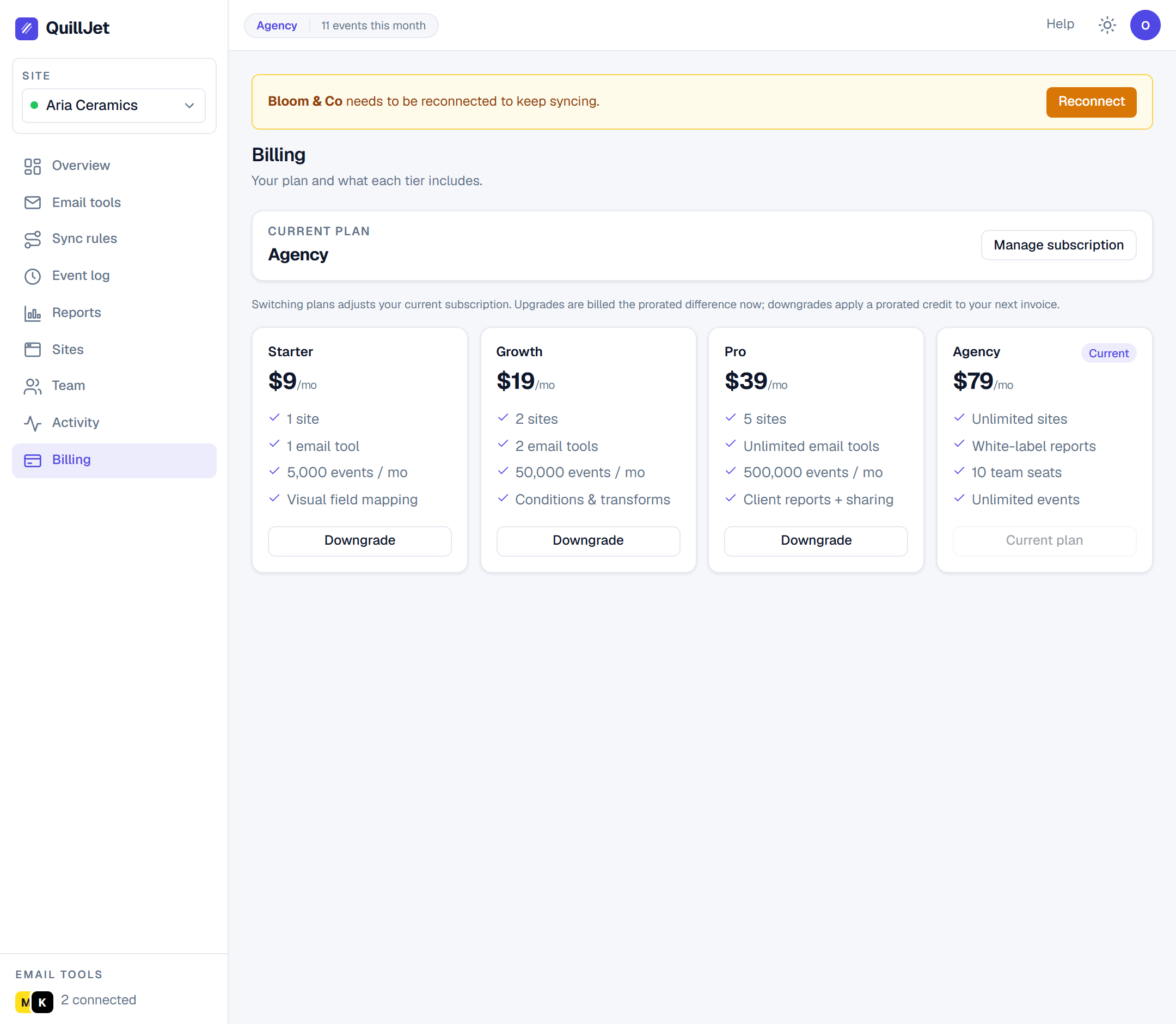
The plans (the 4 tiers + what each includes)
| Plan | Price (VAT included where it applies) | Sites | Email tools | Events / month | Seats | Reports | White-label |
|---|---|---|---|---|---|---|---|
| Free | $0 | 1 | 1 | 2,000 | 1 | No | No |
| Growth | $19 / mo | 2 | 2 | 50,000 | 1 | No | No |
| Pro | $39 / mo | 5 | Unlimited | 500,000 | 1 | Yes | No |
| Agency | $79 / mo | Unlimited | Unlimited | Unlimited | 10 | Yes | Yes |
Every plan includes the full sync engine: all five Webflow triggers, all seven email tools to choose from, field mapping with transforms, and conditions. The higher tiers raise the limits and unlock client reports, more sites, and (on Agency) team seats and white-label branding.
Tip: Pro is the point where reports and shareable client links turn on. Agency adds team seats and white-label. If you need those specifically, that is the tier to pick, regardless of your event volume.
What counts toward limits (sites, email tools, events/mo, seats)
- Sites: each connected Webflow site counts as one site. Pausing a site does not delete it, so it still counts.
- Email tools: each connected email tool counts once, no matter how many rules point at it.
- Events per month: each Webflow event QuillJet receives for your sites counts toward the monthly cap. The cap is a soft limit on delivery only. The month is the calendar month (UTC). If you pass the cap, QuillJet still stores every incoming event in your event log, but it makes no new deliveries until the month rolls over or you move to a higher plan. Events that arrived over the cap are kept for reference and are not delivered afterwards. One event can produce more than one delivery if several rules match it, but it counts as one event.
- Seats: each person on the account is one seat, and the owner is the first seat. See team and permissions.
Changing plans (proration: upgrade charges the prorated difference now, downgrade credits the next invoice)
You can switch plans at any time from the billing view, and Stripe prorates the change:
- Upgrade: you are invoiced the prorated difference immediately for the rest of the current billing period, and the new limits apply right away.
- Downgrade: you are not charged now. Stripe credits the unused time against your next invoice, and the lower price takes over from there.
Your plan's limits and features update to match the plan you switch to. A downgrade never deletes sites or email tool connections. If you have more than the new plan allows, the oldest sites and tools within the limit keep delivering, and events for the others are recorded as skipped (over_plan_site or over_plan_tool) and not delivered later. For a site beyond the limit QuillJet keeps only the event type and time, not the form or order content, since none of it will ever be delivered. They deliver again from the moment you upgrade.
Promo codes
QuillJet supports promotion codes at checkout. If you have a valid code, enter it on the Stripe checkout screen when you subscribe and the discount is applied to your subscription.
Cancelling (customer portal; your contacts stay in your tool)
Cancel anytime through the Stripe customer portal, which you open from the billing view. The portal is also where you update your card and see invoices.
There is no long-term contract. When you cancel a paid plan you drop back to the free plan, so QuillJet keeps syncing within the free limits, and your contacts stay exactly where they are: QuillJet only ever upserted them into your own email tool, and that tool keeps them. Cancelling QuillJet does not touch the audiences, lists, or contacts in your email tool.
Need a hand with a billing question? Reach us through the support form.