Every Webflow order and form, in your email tool, in sync.
Native Webflow to Mailchimp, Klaviyo, Brevo and 4 more. Every order, form submission and CMS item becomes a subscriber in your own audience, mapped field by field, the moment it happens. No Zapier, no per-task fees.
Free to start · no card required · your contacts stay in your email tool
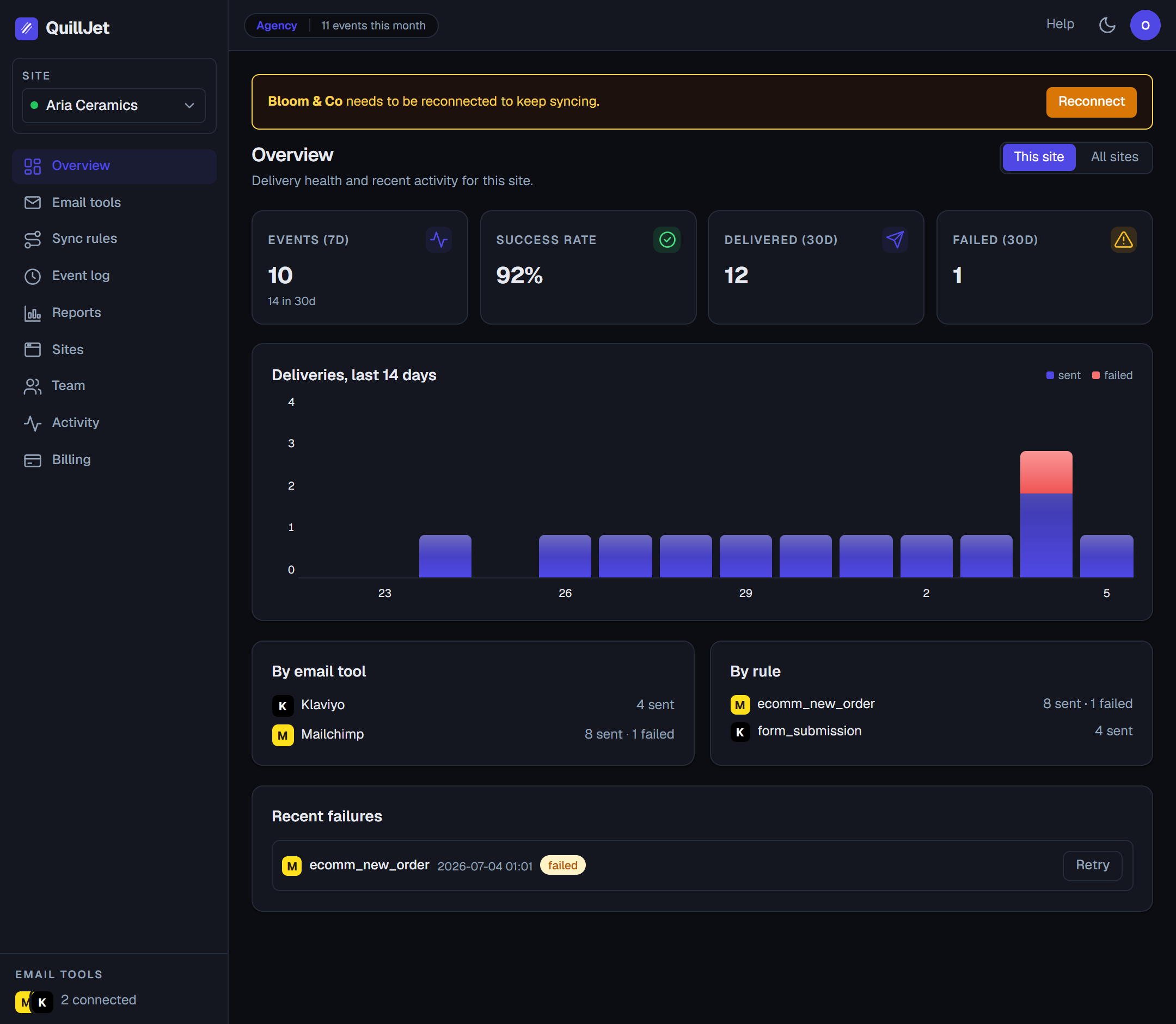
The actual dashboard. Not a mockup.
Works with the email tool you already use
 Webflow
→
Webflow
→  Mailchimp
 Klaviyo
 Brevo
Brevo MailerLite
 ActiveCampaign
 Omnisend
 GetResponse
 The problem
Webflow captures the lead. Your email tool never hears about it.
Webflow forms and Ecommerce collect the contact beautifully, then leave the follow-up entirely to you. Here is what that costs.
Your leads sit in Webflow
Orders and form submissions land in Webflow, not in the tool that actually emails your customers. You export CSVs, or you forget, and the welcome email never goes out.
Zapier and Make add up fast
A multi-step Zap to your email tool is a per-task meter running on every submission, and it still needs babysitting when a form field changes or a run fails quietly.
Re-typing loses people
Copy-pasting addresses into Mailchimp by hand is slow and error prone. One mistyped email is a customer you can never reach again.
Why QuillJet
A real integration, not a brittle Zap
Four things that decide whether your contacts actually make it into your email tool, correct, and that the no-code workarounds get wrong.
Contacts land in your own audience
Every order, form submission and CMS item becomes a subscriber in your own Mailchimp, Klaviyo, Brevo or other tool. Uninstall QuillJet and every contact stays. This is a real integration, not a lock-in.
Mapped field by field, your way
Visual field mapping turns any Webflow field into the exact merge field or attribute your email tool expects, with transforms to split a full name or lowercase an email, plus fixed tags and values. Automap suggests the obvious matches for you.
Only the contacts you want
Per-rule conditions gate delivery: only orders over a value, only when a checkbox is ticked, only when a field exists. Anything that does not match is recorded and skipped, never emailed by mistake.
Never double-adds, retries on its own
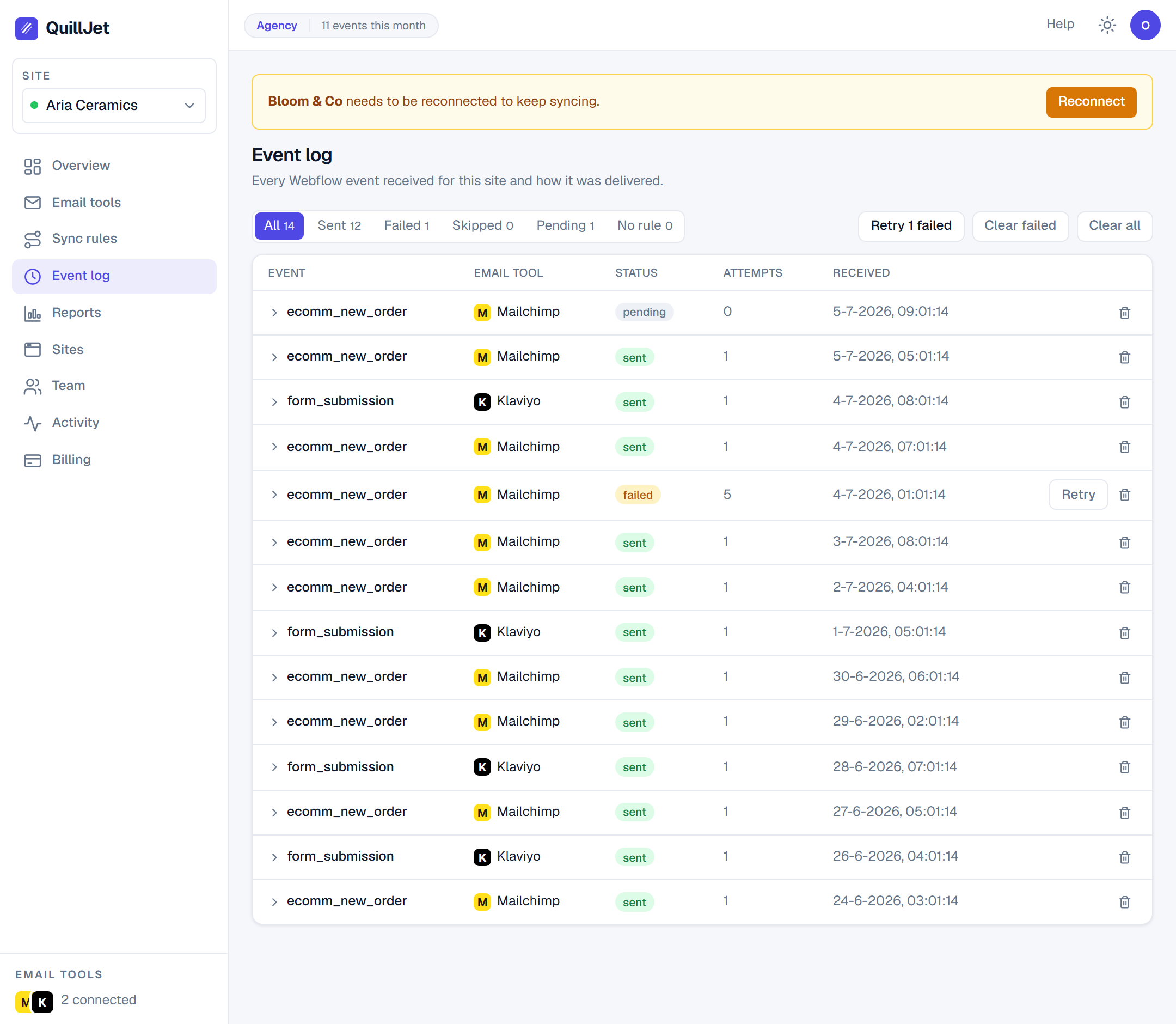
Contacts are matched by email and upserted, so a retry or duplicate webhook updates the same subscriber instead of creating a second. A failed delivery retries with backoff and lands in an event log you can inspect and replay.
See the actual app
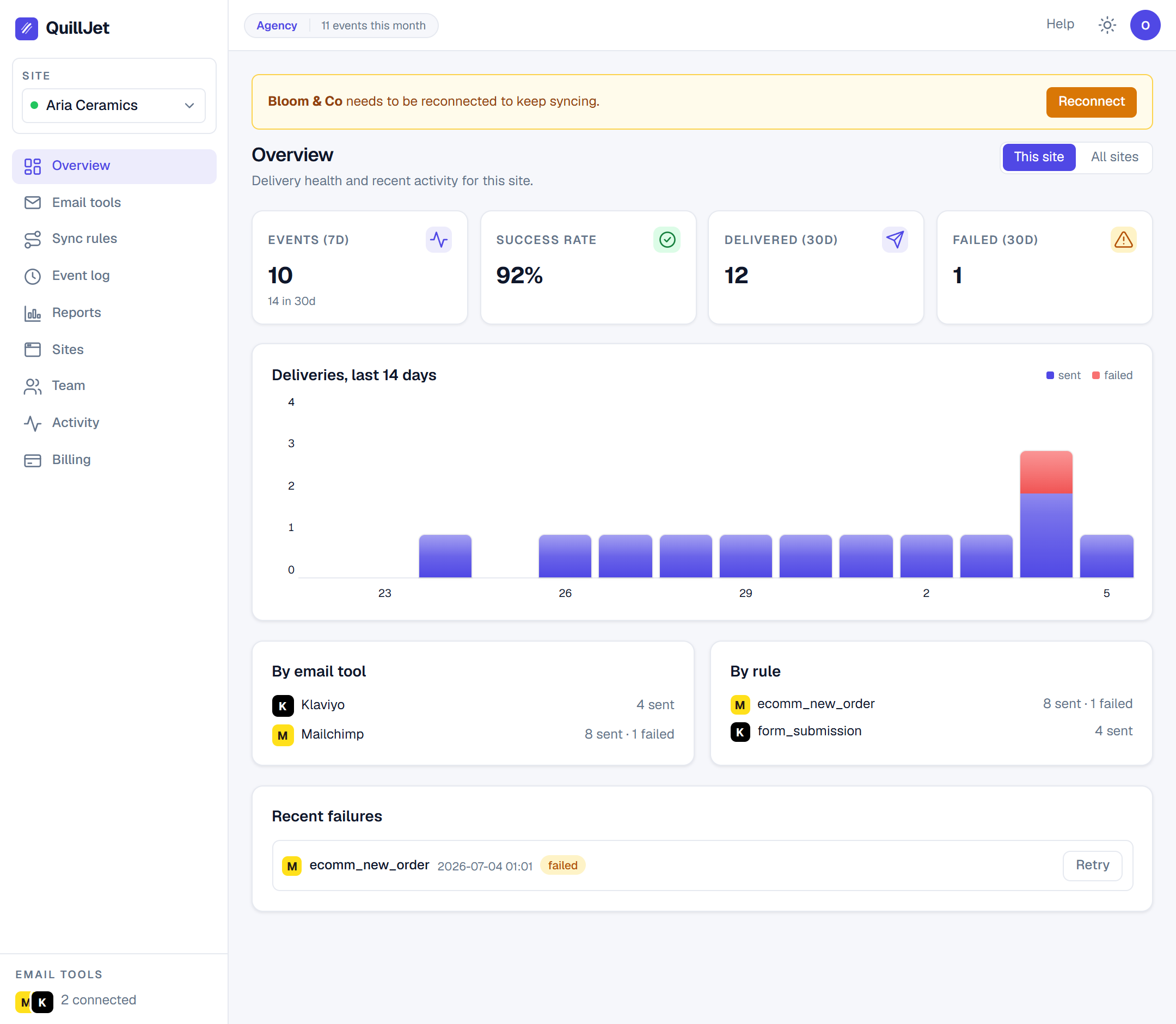
One dashboard for every event and every delivery
Real screenshots of the running product. Delivery status you can trust at a glance, and one click to inspect or replay anything.
How it works
Connect. Map. Done.
Set up takes minutes. After that, contacts sync themselves and you only ever touch the exceptions.
Install on your site. QuillJet reads your orders, form submissions and CMS items. No Designer changes, no code.
Authorise Mailchimp with one click, or paste an API key for any of 7 tools. Pick the audience new contacts join.
Build a rule, map the fields once, and every new event flows into your email tool in real time. Retries and the event log handle the rest.
For agencies & freelancers
Run every client's Webflow-to-email sync from one place
Manage a portfolio of Webflow sites without a tab per client or a login per email tool. QuillJet keeps each account separate, and client reports carry your brand, not ours.
See the Agency planThe honest comparison
vs Zapier & Make
Including where the workarounds technically work. See the full breakdown.
| Feature | QuillJet | Zapier | Make |
|---|---|---|---|
| Native Webflow to 7 email tools | ✓ | ~ | ~ |
| Visual field mapping with transforms | ✓ | ~ | ~ |
| Per-rule conditions and filtering | ✓ | ~ | ~ |
| Upsert by email, never duplicates | ✓ | ✕ | ✕ |
| Automatic retry with an event log | ✓ | ~ | ~ |
| Flat, predictable pricing | ✓ | ✕ | ✕ |
| Runs inside Webflow, no glue account | ✓ | ✕ | ✕ |
| Manage multiple client sites | ✓ | ~ | ~ |
✓ native · ~ possible with steps/add-ons · ✗ not really
Security & trust
It holds your customer data, so it is built to be careful
Official connections, least-privilege access, and your data yours to take back at any time.
Scoped connections, no passwords
You connect Webflow and Mailchimp through their own official sign-in, and other tools with a scoped API key you can revoke anytime. QuillJet never sees an account password.
Least-privilege on Webflow
We request only read scopes for the events you enable, plus the webhooks to receive them. QuillJet cannot change your site, your products or your customers.
Encrypted tokens at rest
Every connection token is encrypted at rest with AES-256-GCM. Adapters decrypt only in memory to make a single API call, and never handle the key.
EU-hosted, GDPR-ready
Data lives on EU infrastructure with a signed DPA available. Export or delete everything from your account whenever you want.
Pricing
Flat pricing. No per-task fees.
Start free on one site. Sites, tools and reporting are the ladder, not your contact volume.
Free
Try it on one site.
- ✓ 1 site
- ✓ 1 email tool
- ✓ 2,000 events / month
- ✓ Field mapping, conditions & transforms
Growth
Growing stores, more tools.
- ✓ 2 sites
- ✓ 2 email tools
- ✓ 50,000 events / month
- ✓ Everything in Free
- ✓ 1 seat
Pro
High volume, client reporting.
- ✓ 5 sites
- ✓ Unlimited email tools
- ✓ 500,000 events / month
- ✓ Client delivery reports
- ✓ Shareable report links
Agency
Agencies managing client sites.
- ✓ Unlimited sites
- ✓ Unlimited email tools
- ✓ Unlimited events
- ✓ White-label reports
- ✓ 10 team seats
Every plan includes the full sync engine, field mapping, transforms, conditions and tags. No lock-in: your contacts always live in your own email tool, and you can cancel anytime.
Why we built QuillJet
Webflow is great at capturing leads and silent about where they go next. Outside of Klaviyo there is no native bridge to the email tool you actually send from, so everyone falls back to CSV exports or a Zapier chain that meters every submission and breaks when a field changes. We wanted the native, mapping-first sync we would trust with our own list: your contacts, in your own audience, upserted correctly, with an event log when something needs a look.
The QuillJet team
From the blog
Webflow, connected to your email tool
Connect Webflow to Klaviyo, ActiveCampaign, GetResponse and 4 more (no Zapier)
Everyone shows the Webflow-to-Mailchimp path. But one contact has to reach seven very different APIs. Here is how QuillJet delivers to Klaviyo, ActiveCampaign, GetResponse and more, and the quirks we found building each.
Jul 11, 2026 How-toHow to map Webflow fields to your email tool (names, custom fields, and gotchas)
The mapping step decides whether a synced contact is clean or full of junk. Here is how to map Webflow fields to your email tool, what QuillJet figures out for you, and the specific gotchas, including one that wrote "[object Object]" into a real audience.
Jul 11, 2026 DeliverabilityWhy Mailchimp rejects your Webflow contacts (and how to fix it)
A contact left your Webflow form but never reached Mailchimp. Here are the exact reasons Mailchimp rejects contacts, including the real 400 errors we hit while testing, and how to fix each.
Jul 11, 2026Questions
Does QuillJet send the emails?
No. QuillJet syncs your Webflow contacts into your own email tool, and your tool owns the sending. That means your lists, your deliverability and your templates all stay exactly where they are. We move the contact and the data, nothing else.
What happens to my contacts if I uninstall?
Every subscriber QuillJet added lives inside your own Mailchimp, Klaviyo, Brevo or other audience. Removing QuillJet stops new syncs, but nothing already synced is touched or removed.
Do you charge per contact or per task?
No. Pricing is a flat monthly tier. There are no per-task fees like Zapier or Make, and the event limits are generous so a busy month never surprises you with a bill.
Which email tools are supported?
Mailchimp, Klaviyo, Brevo, MailerLite, ActiveCampaign, Omnisend and GetResponse. Mailchimp connects with one-click OAuth, the rest with a scoped API key. Need another tool? Tell us on the contact form, we prioritise by demand.
What can trigger a sync?
New Webflow orders, inventory changes, form submissions, and CMS items created or updated. You choose which triggers each site listens to, and each sync rule targets one event and one email tool.
Will it add a contact twice?
No. Contacts are matched by email address and upserted, so a retry, a duplicate webhook or the same person submitting twice updates the one subscriber instead of creating a duplicate.
How do I control which fields get mapped?
QuillJet auto-detects the email and name from any Webflow payload, then you map anything else field by field to the exact merge field or attribute your tool expects. Transforms can split a full name, lowercase a value or trim whitespace, and you can add fixed tags and values.
Can I sync only some submissions?
Yes. Each rule can carry conditions, for example only orders over a total, only when a field equals a value, or only when a field exists. Events that do not match are recorded and marked skipped, so nothing is emailed by mistake.
What if a delivery fails?
It retries automatically with exponential backoff, up to five attempts. Anything that still fails is flagged in the event log with the exact error, and you can inspect the contact and replay it with one click. Persistent failures also email you.
Is my data safe?
You connect through official OAuth or a scoped API key, so we never see an account password. Connection tokens are encrypted at rest with AES-256-GCM, we hold read-only access to Webflow, and everything is EU-hosted with a DPA available.
Got a Webflow site with forms or orders? Let's get them into your email tool.
Tell us about your setup and we will help you get connected, or just get started and wire up your first rule in minutes.
Free to start · no lock-in · your contacts stay in your email tool