Most people never think about the gap between “someone submitted my Webflow form” and “that person is in my email tool.” It is supposed to just happen. But when it goes wrong, it goes wrong in the same few ways every time: the same person shows up three times, a lead you were sure came in is nowhere to be found, or a contact synced but landed without the fields you expected. Understanding what actually happens in that gap makes all of it easy to reason about.
This post follows a single Webflow lead from start to finish. Along the way you will see where duplicate contacts really come from, why some leads are skipped on purpose, and why a lead that fails once usually fixes itself.
The journey of one lead
When something happens on your Webflow site, an order, a form submission, a CMS item, Webflow fires an event. QuillJet listens for the events you have turned on. Here is the path each one takes.
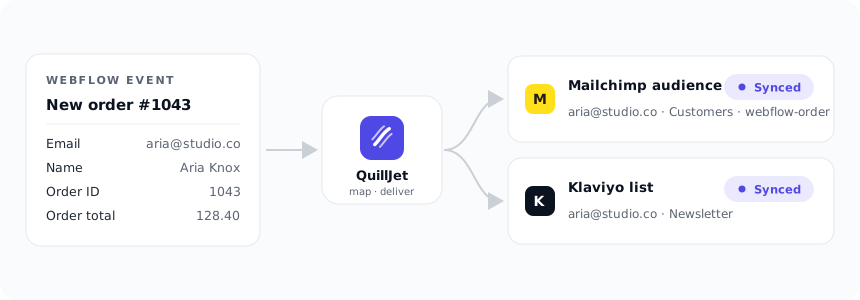
First, QuillJet confirms the event is genuinely from Webflow by checking its signature, then records it. Every event that arrives is stored, no matter what happens next, so there is always a trail. Then QuillJet builds a contact out of it: it finds the email address, works out the first and last name, and adds anything your sync rules map. Finally it hands that contact to your email tool, which adds or updates the person in the audience you chose.
That “adds or updates” step is the whole story of duplicates, so it is worth slowing down on.
Why duplicates happen (and why they do not here)
Duplicate contacts almost always come from one habit: adding people without checking whether they already exist. If a workflow simply creates a new contact every time a form is submitted, then a repeat customer who buys from you three times becomes three separate records. Same person, same email, three entries, and now your list counts are inflated and your segments are messy.
QuillJet avoids this by upserting on email. Upsert means “update if the person exists, otherwise insert.” The email address is the identity. When a contact comes in, QuillJet matches on that email. If the person is already in your audience, their record is updated in place. If they are new, they are added. Either way you end up with exactly one record per email.
Mailchimp is a good concrete example. QuillJet matches the member by the lowercased email address, adds them if new or updates them if they already exist, then applies any tags. The same person buying five times updates one contact five times. They never fan out into five records. The other supported tools work on the same principle: one email, one contact.
So if you are seeing duplicates today, they are almost certainly coming from an older import or a manual process, not from a native upsert. Moving to sync-by-email is usually how the duplicates stop.
Why some leads are “skipped” on purpose
Sometimes you look in the event log and see a delivery marked skipped. This is not a failure. It is a rule doing its job.
Sync rules can have conditions, and conditions decide whether a given event should sync at all. Maybe you only want to add customers whose order was above a certain value, or only people who ticked a marketing checkbox. When an event does not meet a rule’s conditions, QuillJet records it as skipped: not sent to your email tool, but not treated as an error either. All the conditions on a rule have to pass, and if you set no conditions, everything passes.
The valuable part is that skipped events stay visible. You can see the lead arrived and see that a condition held it back on purpose. That is very different from a lead silently vanishing. If you ever think “I know that person submitted the form, where did they go,” the event log answers it: they came in, and here is the exact reason they did or did not sync.
Here is the failure mode we designed against directly: Webflow retries a webhook whenever our endpoint answers with anything other than success, even if the first attempt actually went through and was only slow. Without protection, that retry is a second identical contact. So the first thing QuillJet does with an incoming event is record its id, in the same database transaction that stores the event, so a replay is recognised and dropped before it can ever become a duplicate. Upsert-by-email is the second line of defence; idempotent event handling is the first.
Why a failed lead usually fixes itself
Email tools have off moments. They rate-limit, they have brief outages, they occasionally reject a request. If QuillJet gave up at the first sign of trouble, you would lose contacts to problems that were temporary.
Instead, delivery is queued and retried. When a delivery does not succeed, QuillJet waits and tries again, with the gap growing each time: 30 seconds, then 60, then 120, then 240. It makes up to five attempts before it stops. Most short-lived problems clear well within that window, so a lead that failed on the first try quietly succeeds on the second or third without you touching anything.
If all five attempts fail, the delivery is marked failed and you are notified, so a genuine, persistent problem gets your attention while temporary blips resolve on their own. Retrying is also safe: because QuillJet upserts on email, retrying a delivery cannot create a duplicate. Worst case it updates the same contact again.
The event log is your source of truth
Everything above is visible in one place: the event log. Every event that arrived, and every delivery attempt, is listed with a clear status. There are four statuses, and they mean exactly what they say:
- Pending: queued, on its way, or waiting for a retry.
- Sent: the contact was successfully added or updated in your email tool.
- Skipped: a rule’s conditions were not met, so it was intentionally not synced.
- Failed: something went wrong after the retries were used up.
When a delivery fails, the log tells you why in plain terms. A submission with no email address is marked failed with no_email_in_payload. A Mailchimp or GetResponse rule with no audience selected shows no_target_list. A tool being briefly unreachable shows up as something like mailchimp_unreachable, and a rejected request shows the provider and status, for example mailchimp_401 or brevo_400, with a human-readable detail. You are never left guessing.
And you are never stuck. Open a failed delivery and there is a one-click retry right there. Fix the underlying cause, pick the missing audience, reconnect a tool, and retry, and the contact goes through. No CSV export, no starting over.
What this means for you
Once you can picture the journey, the confusing moments stop being confusing:
- Seeing the same person more than once? That is an artifact of an older import or manual entry, not native sync. Upsert-by-email keeps it to one record per email going forward.
- A lead you expected is missing? Check the event log. It either skipped on a condition, failed with a reason you can read, or never fired because the trigger was not enabled.
- A lead failed once? It very likely already retried and succeeded. If it did not, the reason and a retry button are waiting for you.
The point of doing this natively is that you get a single, honest record of what happened to every lead, and a way to fix the rare miss in one click. If you want to see the flow in your own account, the docs walk through it step by step, and the support form is there if a status in your event log does not make sense.