There are two ways to pay for moving contacts from Webflow into your email tool. You can pay per task, where every synced order or form submission ticks a meter, or you can pay a flat monthly price no matter how many events flow through. The first sounds cheaper when you are small. The second almost always wins once your store gets busy. This post walks the numbers so you can see where the lines cross.
A quick note on the prices below. QuillJet’s plans are fixed and public. Third-party automation pricing changes often and varies by plan, region, and promotion, so treat every task-based figure here as approximate and directional, not a quote. The point is the shape of the two pricing models, not the exact cents.
How per-task billing actually works
General-purpose automation tools bill by the task. A task is roughly one action the tool completes for you. When a Webflow form submission comes in and the tool adds that person to your Mailchimp audience, that is about one task. Simple so far.
The catch is that real workflows are rarely one step. If your automation formats a name, looks something up, adds a tag as a separate step, and only then creates the subscriber, you can burn three or four tasks per single lead. And every one of those steps counts every time, whether the lead was worth having or not. A bot that submits your form fifty times still meters fifty runs.
Metered plans come with a monthly task allowance, and going over means either a higher tier or overage charges. So your bill is tied directly to how much your site is doing. The better your marketing works, the more you pay to process the results of it.
How flat pricing works
Flat pricing charges the same amount regardless of volume, up to a generous ceiling. QuillJet is a flat monthly subscription with no per-task metering and a free plan to start, so the number on your invoice does not move when you have a good month. The plans are:
- Free, $0 per month: 1 site, 1 email tool, 2,000 events per month
- Growth, $19 per month: 2 sites, 2 email tools, 50,000 events per month
- Pro, $39 per month: 5 sites, unlimited email tools, 500,000 events per month
- Agency, $79 per month: unlimited sites, unlimited email tools, unlimited events, 10 seats
An “event” is a Webflow trigger firing: a new order, an inventory change, a form submission, or a CMS item created or updated. Notice the ceilings. Even the free plan covers 2,000 events a month, and Growth jumps to 50,000. For most Webflow stores, one flat tier covers everything they do, with room to spare.
A worked example
Say you run a Webflow store that is doing reasonably well. In a given month you take 800 orders and collect 700 form submissions across your contact, newsletter, and lead-magnet forms. That is 1,500 events you want synced into your email tool.
On a flat plan, that is easy. All 1,500 events sit comfortably inside the free plan’s 2,000-event allowance, so that month costs you nothing. When you outgrow it, you move up to Growth at $19 and you have 50,000 events of headroom. Your cost per synced contact keeps falling as you grow, because the price does not change.
Now price the same 1,500 events on a per-task tool. If each sync is a clean one-task automation, that is about 1,500 tasks. Task plans in the roughly $20 to $30 per month range typically include somewhere around 750 to 2,000 tasks, approximately, so 1,500 tasks might just fit a mid plan or might push you to the next one. Call it around $20 to $30 for the month if everything stays at one task each.
But workflows are rarely one task each. Add a formatting step and a separate tagging step and you are closer to three tasks per lead. Now 1,500 leads is about 4,500 tasks, which lands you on a higher tier, plausibly in the $50 to $70 per month range, approximately, and climbing. Same 1,500 contacts, several times the cost, and the meter keeps running as your marketing works harder.
Here is the same comparison as a table. The task figures are approximate and meant to show direction, not a bill:
| Monthly events | Flat plan (QuillJet) | Per-task, 1 task each (approx) | Per-task, 3 tasks each (approx) |
|---|---|---|---|
| 1,500 | $0 (Free) | around $20 to $30 | around $50 to $70 |
| 8,000 | $19 (Growth) | higher tier | higher tier again |
| 40,000 | $19 (Growth) | well into premium tiers | well into premium tiers |
The flat column barely moves. The task columns climb with every extra step and every extra lead.
The part the sticker price hides
Cost per task is only half the story. The other half is what you get for the money.
With a per-task tool, a skipped or filtered run and a retried run can both still consume tasks, so the meter is not only counting successful, useful syncs. And when something breaks, you are debugging a general-purpose automation that knows nothing about Webflow orders or email audiences specifically.
Flat, native sync is different in a few ways that matter for a store owner:
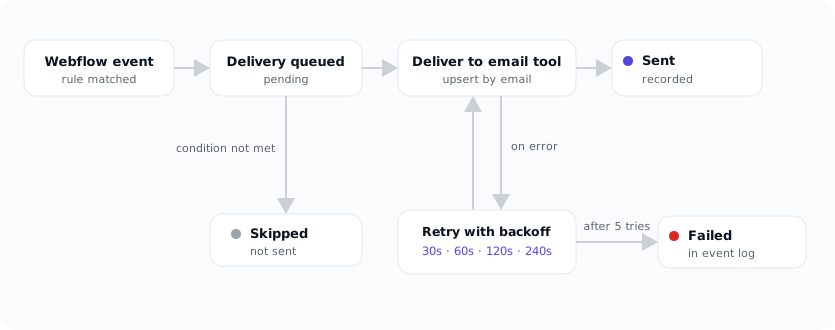
- Retries are included. If your email tool is briefly unreachable, QuillJet retries automatically with increasing gaps, up to five attempts, at no extra cost. You are not paying per retry.
- Skips do not cost you anything either. If a rule’s condition filters a contact out, the event is recorded as skipped, not charged as a premium action.
- Event caps are soft. If you somehow blow past your plan’s monthly allowance, the events are still stored and visible. Only new deliveries pause until the next cycle or an upgrade, so you never lose the record of what came in.
- Everything is in one event log. Every sync, skip, and failure is listed with a plain reason and a one-click retry, so you are not stitching together logs from a chain of steps.
When per-task can still make sense
To be fair, metered automation has its place. If you sync a genuinely tiny handful of contacts a month, or you need to connect dozens of unrelated apps in odd shapes, a general-purpose tool priced per task can be reasonable, and you are paying for its flexibility.
But if your main job is getting Webflow orders and form submissions into your email tool reliably, that flexibility is overhead you do not need. You are paying a metered rate and assembling multi-step workflows to do one focused thing, when a purpose-built app does exactly that for a fixed price.
One thing we only appreciated by watching real traffic: a single Webflow event does not always mean a single delivery. Sync one order to two audiences, or run two rules on the same form, and one submission produces two deliveries. On a flat plan that is invisible, it is still one event against your monthly allowance. On a per-task plan, that same lead is billed twice, once per delivery, and the more places you route a contact, the wider that gap gets.
The bottom line
Per-task pricing is a bet against your own growth. It looks cheap at low volume and gets more expensive precisely when your marketing starts working. Flat pricing does the opposite: the more you sync, the less each contact effectively costs, and your invoice stays predictable.
For most Webflow stores, one flat tier covers a month of orders and form submissions with room to spare, retries and skips included, and a clear log of everything that happened. If you want to see which flat tier fits your volume, the pricing page lays out all four, or reach out through the support form and we will help you size it.